What changes when a partner has their own ReferralPulse account
Every person in your network is a partner. You can add them, log referrals to and from them, take notes, and track their status whether they ever sign up for ReferralPulse or not. So adding someone to your partner list does not require their permission, their email reply, or their account. The list is yours.
What changes is what happens when a partner does have their own account on ReferralPulse. From that moment on, the referrals you log between the two of you stay in sync automatically, status updates flow both directions, and the two of you both see the same picture of your shared work.
The four states a partner can be in
You will see your partners in one of four states. The state lives on the partner's row on the Partners page and on their detail page.
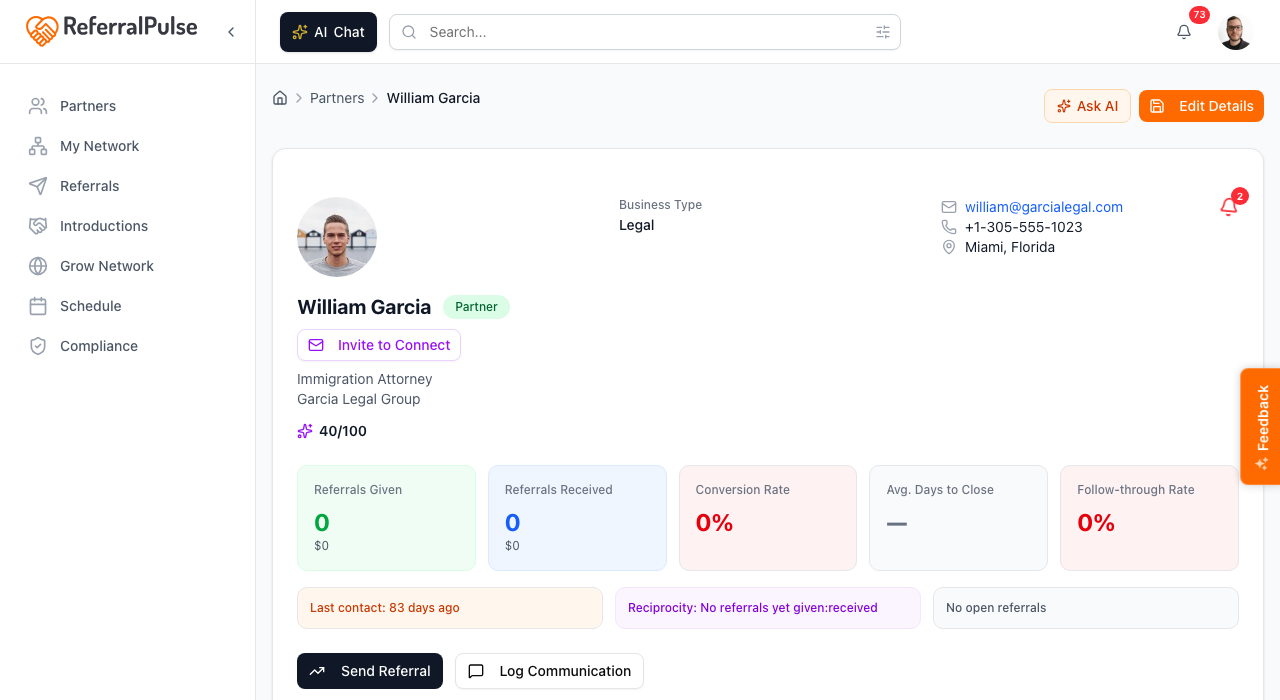
Not invited
You added the partner. You haven't sent them an invitation. There's no badge on the row. You can log referrals, take notes, and track their status, all from your side. They have no idea any of this is happening.
This is the right starting state for most partners. You can stay here forever if the relationship doesn't need an account on their end.
Invited
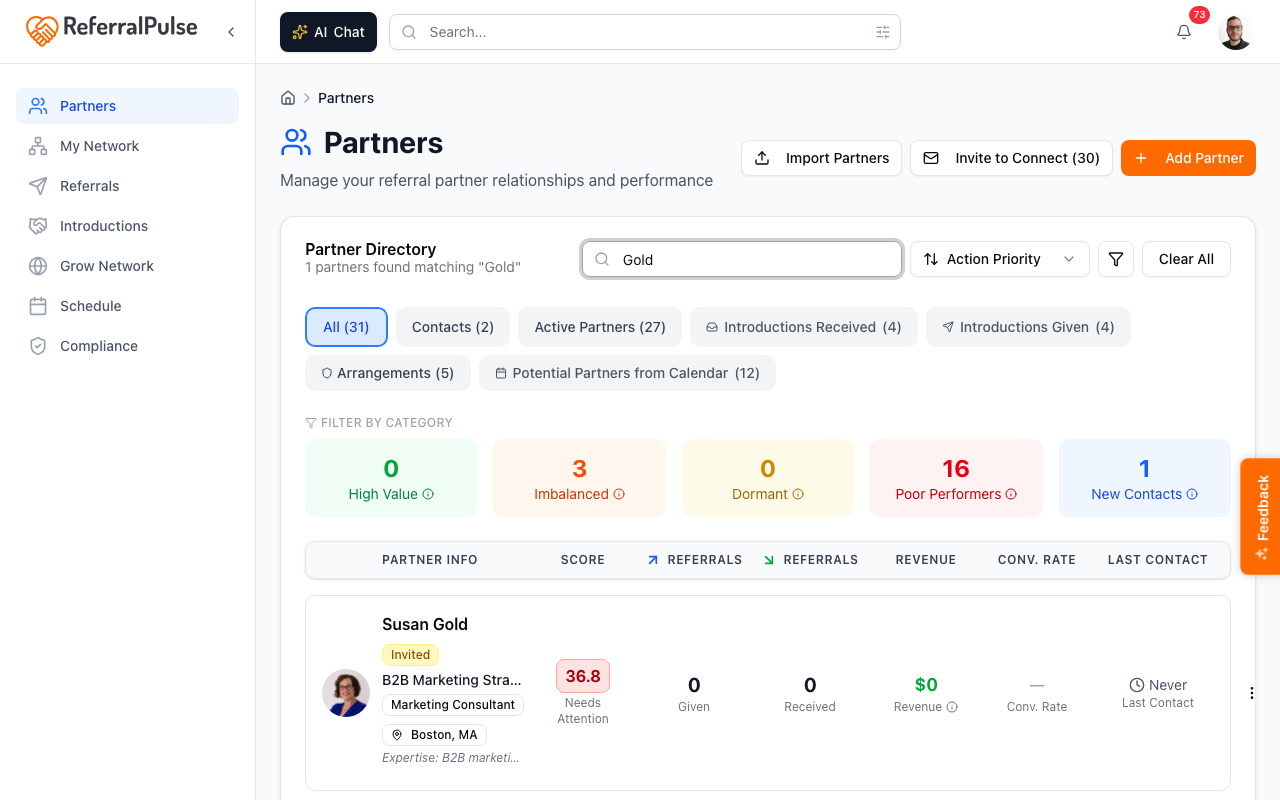
You sent them an invitation, and they haven't done anything with it yet. The Partners page shows a yellow Invited badge on their row.
What happened: the assistant emailed them a link asking them to fill in their profile. The link doesn't require them to create an account, just to confirm their details. Until they click the link, the row stays in the Invited state.
If a partner stays in Invited for weeks, the email might be sitting in their spam folder, or they might just be busy. The detail page has a Re-invite to Connect button so you can resend without creating a duplicate invitation.
Profile updated
The partner clicked the invitation link and filled in their profile. The row now shows a blue Profile Updated badge instead of yellow Invited.
What happened: their profile data is now richer than what you typed in. Their bio, expertise, ideal customer, and any other details they filled in are visible on their partner detail page on your side. They have not created an account yet, so the syncing behavior described in the next section is not active.
This is a real win. You now have an up-to-date profile straight from the partner without having to ask. The detail page still shows Re-invite to Connect so you can nudge them toward a full account when the time is right.
Registered user
The partner created their own account on ReferralPulse. The detail page no longer shows an invite button. Instead, where the Invite to Connect button used to live, you see a disabled Registered User label.
This is when the synchronizing behavior turns on, see below.
What turns on when a partner becomes a Registered User
Once your partner has their own account, three things change in the background.
Referrals stay in sync. When you log a given referral to them, a matching received referral is created on their side automatically. They see the same client, the same opportunity, the same value, and the partner relationship pointing back to you. You don't email them, you don't tell them, the record is just there in their own dashboard the next time they open it.
Status updates flow both ways. When you mark a referral Won, Lost, or Declined, their copy of the same referral updates to match. When they update their copy on their side, your copy updates. Both of you see an activity-timeline entry that reads Status changed to Won (synced from partner) so it's clear the change came from the other side.
Profile changes propagate. When the partner edits their bio, expertise, or contact details on their account, those updates appear on your view of their partner detail page. Anything you wrote about them yourself, your private notes, your relationship history, your custom overrides, stays only on your side.
The sync covers the referral, not the email. You still review and approve any partner-facing email the assistant drafts (status updates, thank-yous, follow-ups). Auto-syncing applies to data, not to communication.
What does not change
A few things work the same regardless of whether your partner has an account.
- Introductions are sent by email either way. The intro composer drafts the same email whether both parties are on ReferralPulse or only one of you is.
- Your private notes stay private. Anything in the gray Your Notes panel on the partner detail page, your relationship history, personal details, the introduction paragraph you use for them, is only visible to you.
- Your custom overrides on a shared profile stay yours. If the partner's profile says they specialize in family law and you've written your own override saying "they actually do mostly trust and estate work for me," your override does not change theirs and theirs does not change yours.
- Drafts before sending still apply. Every email the assistant produces lands as a draft you review.
The partnerStatus field is a separate thing
Don't confuse "is the partner on the app" with the partnerStatus value on their detail page. partnerStatus shows up under the partner's name and reads Contact, Partner, or Inactive. It describes the relationship from your side:
- Contact is someone you know but who isn't in your active referral network.
- Partner is someone you actively exchange referrals with, your referral relationship is on.
- Inactive is a former partner you've stopped working with.
You set this manually. It changes nothing about whether the partner has an account, whether referrals sync, or whether they get notifications. It's a marker for you. The active partner list views default to filtering by Partner.
Get more out of your assistant
Inviting a partner has a real cost: their inbox, their attention, the small chance the email feels like spam. So invite intentionally.
The partners worth inviting first are the ones you exchange referrals with often. Once their state flips to Registered User, the assistant has more accurate, more timely information about that relationship to feed back into your dashboard, your dormant-partner reminders, and your gap-finding suggestions. Status sync also means the assistant doesn't have to nudge you to chase them for an update on a deal, the update appears on its own.
Partners you've added once and never logged a referral with rarely benefit from being invited. The relationship may not be active enough to justify pulling them onto the platform.
If you're not sure who to invite, sort the Partners list by referrals exchanged in the last six months and start with the top of the list. Click Invite to Connect on the partner detail page or use the Invite to Connect button at the top of the Partners page to send several invitations as a batch.
On the iOS app
Where to find it: Bottom navigation → Partners tab.
The partner list on iOS shows the same Invited and Profile Updated badges as the web. Tap any partner to see the detail page, where Invite to Connect, Re-invite to Connect, or Registered User appears depending on the state.
You can also invite a partner by voice in the AI Chat. Try:
Invite Sarah Chen to connect on ReferralPulse.
The assistant pulls Sarah from your partner list, drafts the connection email, and waits for your approval before sending. From there the same flow applies, Invited becomes Profile Updated when she clicks the link, and Registered User once she creates an account.
The voice flow is especially useful when you're between meetings and just thought of someone to invite. Speak the name, approve the draft, done. You don't need to find the partner's row in a list.