How a referral plays out, solo vs both partners on the app
A lot of new users wonder if their partners need to be on ReferralPulse for the app to be useful. The short answer is no. Most of what you do, log referrals, track status, take notes, get reminders, draft thank-yous, works the same way whether your partner has an account or not.
A few things change when both of you are on the app. The data side of the relationship, the referral records and their statuses, syncs between you automatically. The communication side, the emails that go out to your partner, does not. Every email you send to a partner is always a draft you approve, in both scenarios.
This article walks through the most common moments and shows you what happens on each side of the table.
Scenario 1: You give a referral to your partner
You're sending a client to your partner. You open the Give Referral form, pick the partner, fill in the client's details, save.
When your partner is not on ReferralPulse:
- The referral is logged on your side.
- A notification draft opens with subject and body pre-filled, addressed to the partner.
- You review the draft, edit anything, and click Send email, or Skip if you'd rather reach out separately.
- The partner gets an email from you with the client's contact info. That email lands in their inbox like any other email.
- They have no record of the referral on a dashboard, because they don't have an account. The record is yours.
When your partner is on ReferralPulse:
- The referral is logged on your side.
- A matching received referral is created on their account in the background. They see it in their Referrals list under Received the next time they open the app, with the client's details, the opportunity, and a partner relationship pointing back to you.
- The same notification draft opens with subject and body pre-filled. You can still send it. You can also Skip, since the partner already has the record on their dashboard either way.
So the email is optional in the second scenario. The record is already there.
If your partner is on ReferralPulse, the notification email is mostly there to keep the warm handoff feeling personal. You're not relying on it for the data to land, you're using it to introduce the client and let your partner know they should expect a call.
Scenario 2: A status changes
The deal closes, falls through, or gets declined. You go to the referral and pick Mark Won, Mark Lost, or Mark Declined from the three-dot menu.
When your partner is not on ReferralPulse:
- Your copy of the referral updates immediately.
- Your dashboard's won-this-month and at-risk totals adjust.
- If you want to tell the partner, the assistant can draft a status-update email for you in your Action Queue. You review it and send.
When your partner is on ReferralPulse:
- Your copy of the referral updates immediately.
- Their copy of the referral updates to match. They see the new status the next time they look at the referral on their side, with an activity-timeline entry that reads Status changed to Won (synced from partner) so it's clear the change came from you.
- Their dashboard reconciles automatically.
- The assistant still queues a status-update draft if the change is meaningful enough to warrant a personal note (a Won, a Lost, a long-stuck Open). You review and send. The email is not required for the data to be in sync, the data is already in sync.
Sync works in both directions. If your partner marks a Won on their side first, your copy updates the same way. The dashboard at-risk and won totals adjust without you having to do anything.
Scenario 3: Your partner sends you a referral
A partner has a client they want to send your way.
When the partner is not on ReferralPulse:
- They email you, call you, or mention it in a meeting.
- You open the Receive Referral form yourself and log it. Pick the partner, fill in the client's details, save.
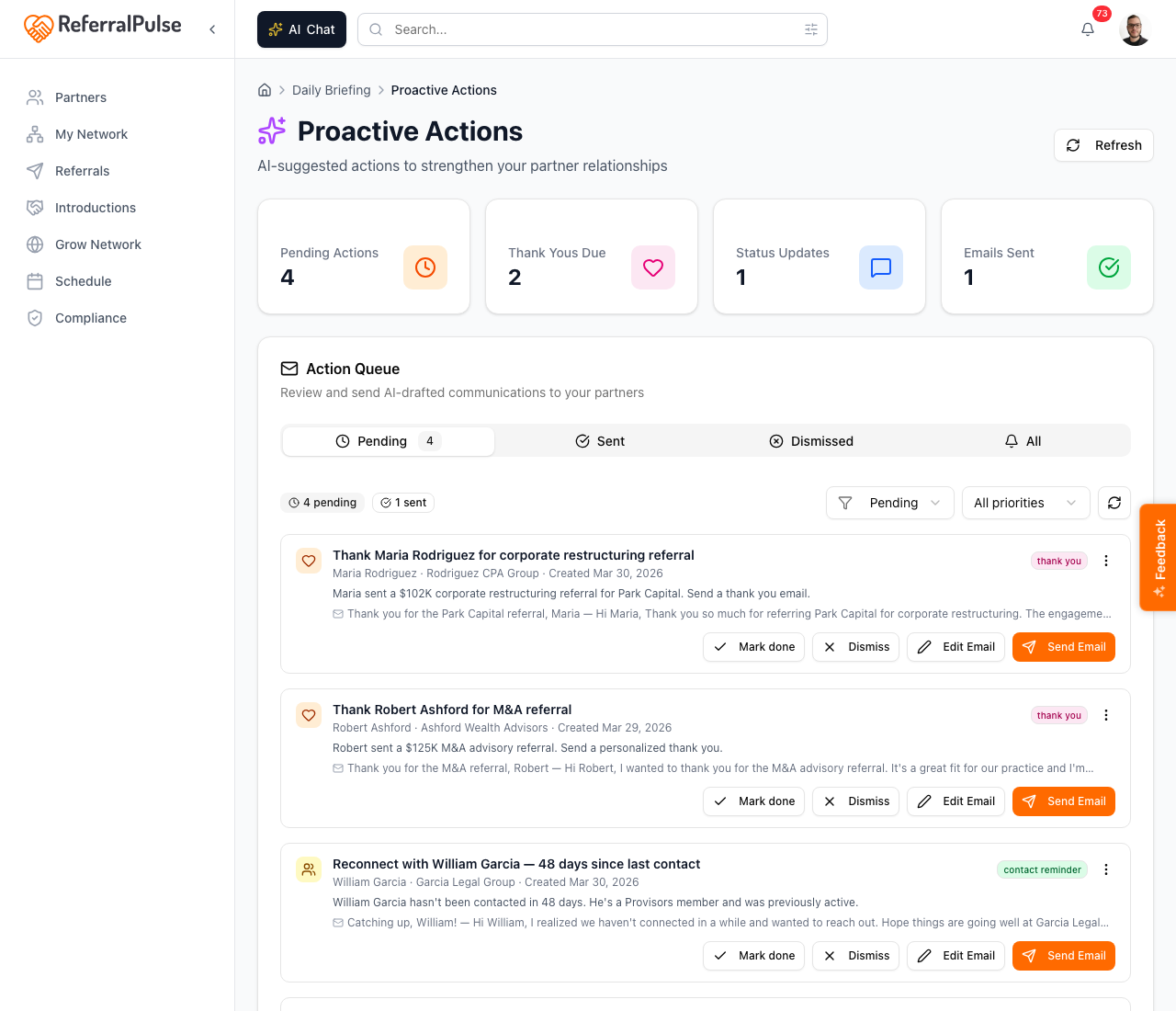
- The assistant drafts a thank-you email to the partner. You review and send.
When the partner is on ReferralPulse:
- They open their own Give Referral form, pick you, fill in the client's details, save.
- A matching received referral is created on your account automatically. You'll see a new card in your Referrals list and a notification.
- The assistant still drafts a thank-you in your Action Queue. You review and send.
In both cases the thank-you draft works the same way. The difference is who fills out the form, you or your partner.
Scenario 4: Making an introduction
You want to introduce two people in your network to each other.
When one or both of them are on ReferralPulse:
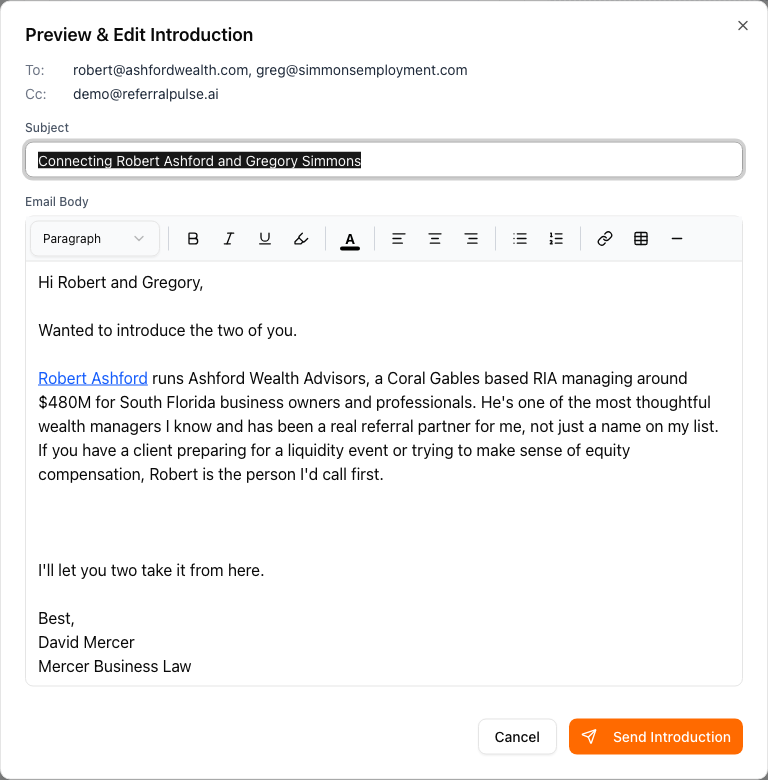
- The flow is the same in either case. You open the introduction composer, pick the two partners, the assistant drafts the intro email with both bios and a sign-off, you click Preview & Edit, you review, you click Send Introduction.
- The email goes out by email, not as an in-app message. Both people receive a single email with the intro text and each other's contact details.
Introductions are an email-first feature, deliberately. The point is to land in the recipients' inboxes the same way an introduction email always has, so the experience feels familiar and the recipients can reply directly.
The rule that makes this make sense
The pattern across every scenario is the same:
Data auto-syncs when both of you are on ReferralPulse. Communication is always draft-and-approve.
If you and your partner both have accounts, the referral records, the statuses, the financial details, all flow between you with no manual step. You don't need to email each other to keep your dashboards aligned, the dashboards align themselves.
If only you have an account, you have a complete view of the relationship from your side, and you communicate with your partner the way you always have, by email. The assistant just makes the emails faster to draft.
What does not change between the two scenarios is the email-approval rule. Even when sync is on and the data is already where it needs to be, the assistant never emails your partner without you reviewing the draft first. Your relationship is yours, your name is on every message, and a draft always waits for your approval before going out.
Get more out of your assistant
If your partner is on ReferralPulse and you've never logged a referral with them, the dashboard's view of your partnership is sparse. Your assistant has nothing to flag, no patterns to surface, no dormant-partner reminders to draft. Logging a few past referrals on your side gives the assistant the context it needs even when sync is on. The data syncs forward, but it does not retroactively pull old emails or invoices.
The same applies in reverse. If you've been logging referrals diligently and your partner just signed up, sync only kicks in for referrals logged from that point forward. Past referrals on your side stay yours, the partner does not retroactively receive copies of them.
When a key partner joins ReferralPulse, take a few minutes to log any in-flight referrals between the two of you. Sync starts from the moment the record exists, so future updates stay in lockstep. Past referrals you log after they joined will not push to their account, but they will still keep your own dashboard accurate.
On the iOS app
Where to find it: Bottom navigation → Referrals tab to log or update referrals. Chat tab for voice and text drafting.
The behavior is identical on iOS. Logging a Give Referral or Receive Referral against a partner who's on ReferralPulse triggers the same auto-sync. Marking a status from the three-dot menu on a referral row pushes the change to the partner's account when both of you have accounts.
Voice works the same way too. You can dictate "Sarah just sent me a client called Mark Watts at ABC Corp" and the assistant logs the received referral. If Sarah's on ReferralPulse, the matching record on her side appears automatically. If she's not, you still have a clean record on your side.
A partner accepting an invite while you're between meetings doesn't trigger any catch-up sync. The next referral you log after they join is the first one that flows to them. The assistant won't surprise them with a backfill of old data.